InvoicerX Android App for US Invoices and Quotes

Your US-focused invoice generator with EIN & routing number support

🛡️ Privacy-first
🔒 No cloud • No tracking • Local storage only
Your data stays on your device
Get it on Google Play

Your all-in-one invoice generator app

Scan QR code to download Invoicer X app

Scan to open Google Play

🆕 What's New

Release Date: 17.01.2026

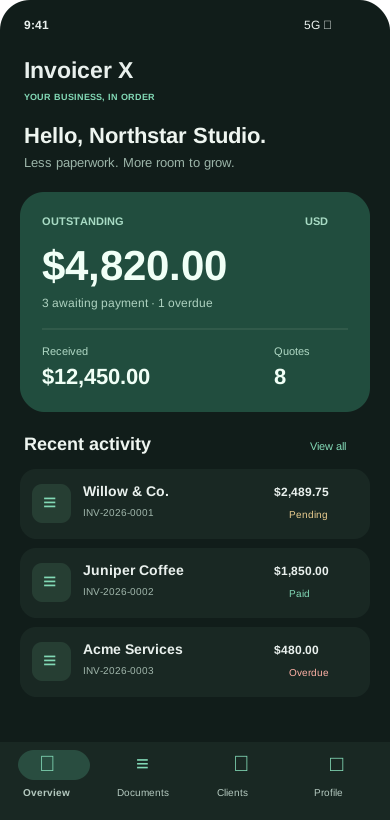
Invoicer X – New Dashboard Update:

  • Added a brand new dashboard to provide a clear overview of all invoices and quotes.
  • Every time you save a PDF file, it will now appear on the dashboard, whether it’s an invoice or a quote.
  • Introduced a search bar for quickly finding any file.
  • Click on any file in the dashboard to instantly preview the PDF.
  • All saved files can also be accessed in your device’s Downloads folder.

01.01.2026 — Quote support: Invoicer X now includes full quote creation support. Save, export and share quotes as PDFs instantly.

🇺🇸 Built for the United States

Invoicer X is optimized for the US region, supporting USD billing, EIN-based invoicing, and US banking requirements.

What is Invoicer X?

Invoicer X is your solution for creating fast, professional, customizable invoices. Whether you're a freelancer or small business owner, this app simplifies billing.

With clean design and US-focused features, Invoicer X helps you stay organized and get paid faster.

📲 How to Use Invoicer X

  1. Step 1: Download the app from Google Play.
  2. Step 2: Open the app and go to My Profile.
  3. Step 3: Select your preferred language before filling in your profile.
  4. Step 4: Fill in your company details and (optionally) add your logo.
  5. Step 5: Save your information by tapping Save Profile.
  6. Step 6: Go back to the Invoice section.
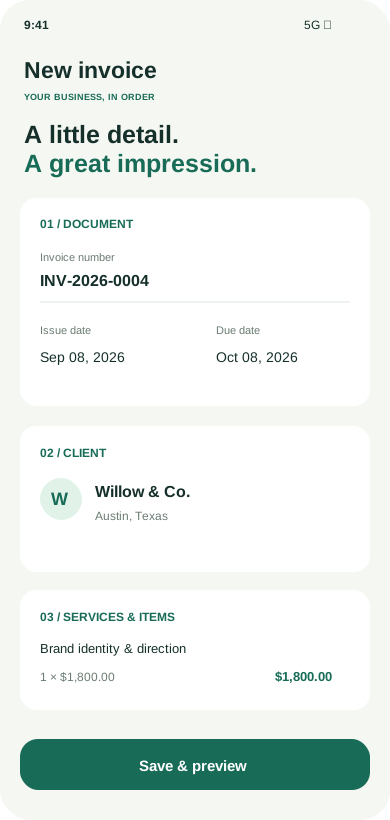
  7. Step 7: Enter client details.
  8. Step 8: Add services, quantities, and prices.
  9. Step 9: Tap Generate Invoice.
  10. Step 10: Save as PDF or print if needed.

⚠️ The invoice will not generate correctly if required fields are missing.

Simple and fast! ⚡

App Screenshots Gallery

Screenshot 0

Different Templates

Screenshot 1

Adding New Clients

Screenshot 2

Automatic Tax Calculation

Screenshot 3

Client Overview

Screenshot 4

Managing Saved Clients

Screenshot 5

Generate an Invoice

Screenshot 6

Currency Selection

Screenshot 7

Multiple Service Items

Screenshot 8

Saved PDF Invoice

Screenshot 9

Company Logo Upload

Screenshot 10

Mobile Layout

Try Invoicer X – Free for 3 Days!

Enjoy full access to premium features during your trial – no commitment, cancel anytime.

Key Features

  • Dynamic Invoice Creation — Clean invoices in seconds
  • Client Management — Save and reuse clients
  • Automatic Numbering — No manual tracking
  • PDF Export — Save/print instantly
  • Logo Upload — Branding in one tap

Ideal for

Freelancers, consultants, contractors, and small businesses (B2B) who need fast, professional invoicing.

Download on Google Play

Need a Desktop or Custom Version?

If you would like a desktop version of Invoicer X or a tailored version, contact us and we’ll help.

Tip: add invoice number in subject if needed.